Web Devlopment/NextJs
TanStack Query (react-query) - #2 (useMutation, 등록/수정/삭제)
키모형
2026. 1. 18. 16:24
반응형
이전 강의에 이어서 테스트를 위해 json-server 설치 (useMutation 테스트용)
json-server 설치
npm i json-server
db.json 파일 추가 (테스트용 db파일)
{
  "posts": [
    {
      "id": 1,
      "title": "첫 번째 포스트",
    },
    {
      "id": 2,
      "title": "두 번째 포스트",
    }
  ]
}
파일 저장후 npx json-server db.json 으로 json server 실행
npx json-server db.json


JSON Server started on PORT :3000
Press CTRL-C to stop
Watching db.json...

♡( ◡‿◡ )

Index:
http://localhost:3000/

Static files:
Serving ./public directory if it exists

Endpoints:
http://localhost:3000/posts
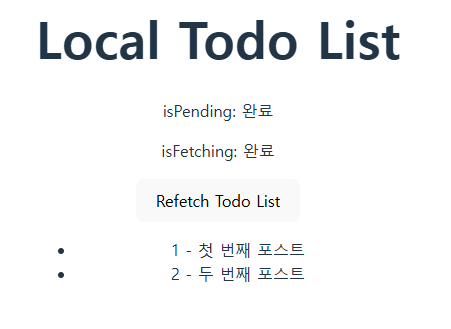
TodoListLocal.tsx
import { useQuery } from "@tanstack/react-query";

export default function TodoListLocalPage() {
  const { data, isPending, isFetching, isError, error, refetch } = useQuery({
    queryKey: ["todoListLocal"], // 각 쿼리를 식별하는 고유 키
    queryFn: async () => {
      const response = await fetch("http://localhost:3000/posts");
      return await response.json();
    },
  });

  // 에러 상태 처리
  if (isError) {
    return <span>애러발생: {error.message}</span>;
  }

  return (
    <div>
      <h1>Local Todo List</h1>
      <p>isPending: {isPending ? "Pending..." : "완료"}</p>
      <p>isFetching: {isFetching ? "Fetching..." : "완료"}</p>

      <button onClick={() => refetch()}>Refetch</button>
      <ul>
        {data?.map((todo: any) => (
          <li key={todo.id}>
            {todo.id} - {todo.title}
          </li>
        ))}
      </ul>
    </div>
  );
}
등록/삭제 추가
import { useMutation, useQuery, useQueryClient } from "@tanstack/react-query";
import axios from "axios";
import { useState } from "react";
import { v4 as uuidv4 } from "uuid";

type Post = { id: string; title: string };
type PostCreate = { title: string };

const api = axios.create({
  baseURL: "http://localhost:3000",
  headers: { "Content-Type": "application/json" },
});

export default function TodoListLocalPage() {
  const qc = useQueryClient();
  const [title, setTitle] = useState("");

  // 포스트 목록 조회 쿼리
  const {
    data = [],
    isPending,
    isFetching,
    isError,
    error,
    refetch,
  } = useQuery<Post[]>({
    queryKey: ["posts"],
    queryFn: async () => {
      const res = await api.get<Post[]>("/posts");
      return res.data;
    },
  });

  // 등록함수
  const addPost = async (input: PostCreate): Promise<Post> => {
    // 1초 지연 시뮬레이션
    await new Promise((resolve) => setTimeout(resolve, 1000));
    const payload: Post = { id: uuidv4(), title: input.title.trim() };
    const res = await api.post<Post>("/posts", payload);
    return res.data;
  };

  // 등록 뮤테이션
  const { mutate, isPending: isAdding } = useMutation({
    mutationFn: addPost,
    onSuccess: () => {
      setTitle("");
      // refetch() 대신 캐시 무효화 → 자동 재조회
      qc.invalidateQueries({ queryKey: ["posts"] });
    },
    onError: (err) => {
      const msg = axios.isAxiosError(err)
        ? (err.response?.data?.message ?? err.message)
        : (err as Error).message;
      console.error("등록 실패:", msg);
    },
  });

  // 등록 폼 제출 핸들러
  const submitHandler = (e: React.FormEvent<HTMLFormElement>) => {
    e.preventDefault();
    const t = title.trim();
    if (!t) return;
    mutate({ title: t });
  };

  // 삭제함수
  const deletePost = async (id: string): Promise<void> => {
    // 1초 지연 시뮬레이션
    await new Promise((resolve) => setTimeout(resolve, 1000));
    await api.delete("/posts/" + id);
  };

  // 삭제 뮤테이션
  const { mutate: deletePostMutate, isPending: isDeleting } = useMutation({
    mutationFn: deletePost,
    onSuccess: () => {
      qc.invalidateQueries({ queryKey: ["posts"] });
    },
    onError: (err) => {
      const msg = axios.isAxiosError(err)
        ? (err.response?.data?.message ?? err.message)
        : (err as Error).message;
      console.error("삭제 실패:", msg);
    },
  });

  if (isError) {
    return <span>에러발생: {(error as Error).message}</span>;
  }

  return (
    <div>
      <h1>Local Todo List (UUID)</h1>
      <p>isPending: {isPending ? "Pending..." : "완료"}</p>
      <p>isFetching: {isFetching ? "Fetching..." : "완료"}</p>

      <form onSubmit={submitHandler}>
        <input
          type="text"
          value={title}
          onChange={(e) => setTitle(e.target.value)}
          placeholder="새 포스트 입력"
        />
        <button type="submit" disabled={isAdding}>
          {isAdding ? "등록중..." : "등록"}
        </button>
      </form>

      <hr />
      <ul>
        {data.map((p) => (
          <li key={p.id}>
            {p.id} - {p.title}
            <button
              onClick={() => deletePostMutate(p.id)}
              disabled={isDeleting}
            >
              {isDeleting ? "삭제중..." : "삭제"}
            </button>
          </li>
        ))}
      </ul>
    </div>
  );
}
반응형